Where to find it
Browser: Services & prices. App: the price list is below Public profile.
Step by step
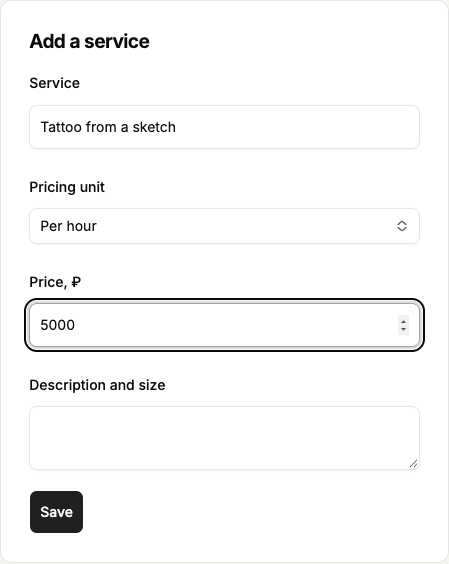
- Save your profile. In the browser open Services & prices; in the app open Public profile and scroll down to Services and prices. In Service name your offer, for example Small tattoo up to 5 cm.
- In the browser choose Pricing unit: Per hour, By size or Fixed. In the app choose Unit: Hour, Size or Service. Explain what the price includes in the description.
- Enter a ruble amount such as 1500 or 1500.50. In the browser select Save in the Add a service form; in the app select Add service.
- Check the new price-list row and amount. To edit, select Edit service, change the details and Save. To remove it use Remove in the browser or Delete service in the app.
 Enlarge screenshot
 Buttons and fields
- Service / Description and size
- The title explains your service. In Description and size in the browser or Description in the app state the size, duration and other price conditions.
- Pricing unit
- Choose what the amount covers: an hour, the stated size or the whole service. In the app the field is Unit. Changing the unit does not recalculate the entered amount.
- Price, ₽
- Accepts a positive ruble amount with a dot or comma and up to two decimal places, for example 1500 or 1500.50.
- Add a service / Edit service
- In the browser Add a service is the form heading; select Save after completing it. In the app Add service submits the form. Edit service opens an existing row.
- Save / Close / Remove
- Save records edits and Close closes the editor. Remove in the browser or Delete service in the app removes the price-list row. Removal does not cancel agreements with booked clients.
How to tell it worked
The price list shows current offers. Clients can compare them, but you agree on a specific session’s final price directly.
Things to know
- Your service prices and Tatooir’s own tariffs are separate. Editing a price list does not buy placement.
If something goes wrong
I cannot add a service or price.
First confirm the profile was saved. Then check the title, positive amount and decimal places. After a price-list load failure, refresh data before editing; a cached list does not prove it is current.