Where to find it
Appointments → Your appointments. A studio can open its combined list or the selected artist’s appointments.
Step by step
- Open Appointments. In the browser choose Active under Show appointments; in the app select Active. Check the client, artist, date and note in the relevant card.
- If a future request suits you, select Confirm; otherwise select Decline. To discuss another date use Discuss appointment or Propose a new time.
- To cancel before the session starts, select Cancel appointment in the browser or Cancel in the app. A rescheduling proposal does not change the time without the other participant’s agreement.
- After the confirmed session’s end time select Complete. Find completed and cancelled appointments in History.
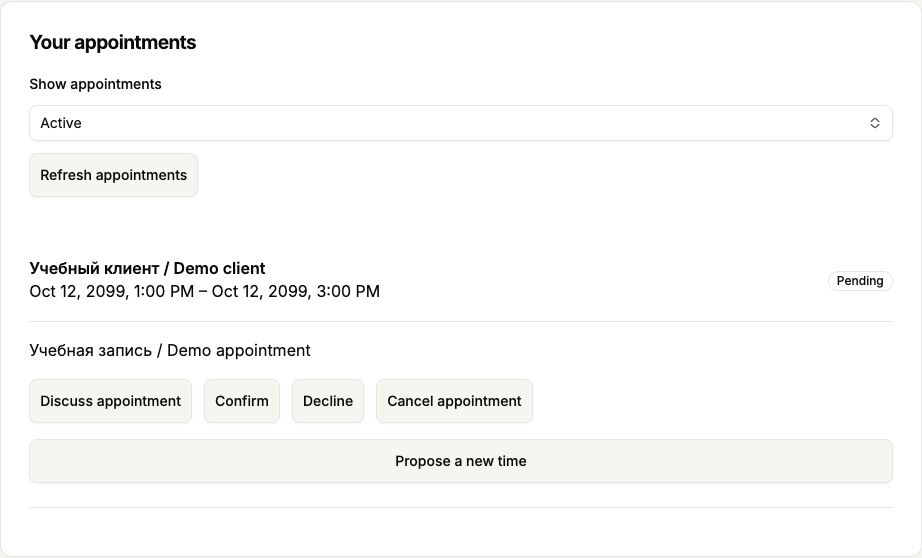 Enlarge screenshot
 Buttons and fields
- Confirm
- Accepts a future pending request when no reschedule proposal is active. Normal confirmation cannot repair a request after its start.
- Decline
- Tells the client you do not accept their request. A request still awaiting a decision can be declined even while a rescheduling proposal is pending.
- Cancel appointment / Cancel
- Cancel appointment in the browser or Cancel in the app cancels a future appointment. It does not mark a completed session or refund money.
- Complete
- After a confirmed session’s end time, marks it as completed. It does not collect session payment.
- Discuss appointment
- Opens the related conversation when authorised. It sends nothing automatically.
- Active / History / Refresh appointments / Previous / Next
- Select current or closed appointments, refresh and page through the list. A past appointment not yet completed can remain active.
How to tell it worked
After a decision, the status and permitted next actions change. Wait for saving and refresh to finish before another decision.
Things to know
- If you previously booked as a client, personal appointments can also appear. Check the other participant and available actions; being an artist does not grant provider decisions on your own client booking.
If something goes wrong
Why is the decision action missing?
Check the status, session start and end, reschedule proposal and your side of participation. These conditions determine actions. If the start time passes while the calendar is being checked, confirmation is not saved. Refresh the appointment and check its status first.